Skip to content
  • Contact Us
  • warranty
  • Support
    • Firmware
    • Getting Started
    • Camera Setup
    • Cloud Portal
    • CGI API
    • Edge AI
    • Troubleshooting
    • Downloads
    • Enterprise Support
  • User Guides – How-To
  • Docs

How to set DNS to 8.8.8.8 & 8.8.4.4

January 17, 2020August 5, 2017 by microseven

To set DNS 8.8.8.8 and 8.8.4.4 and make camera streaming flawlessly:
Here is how to do it:
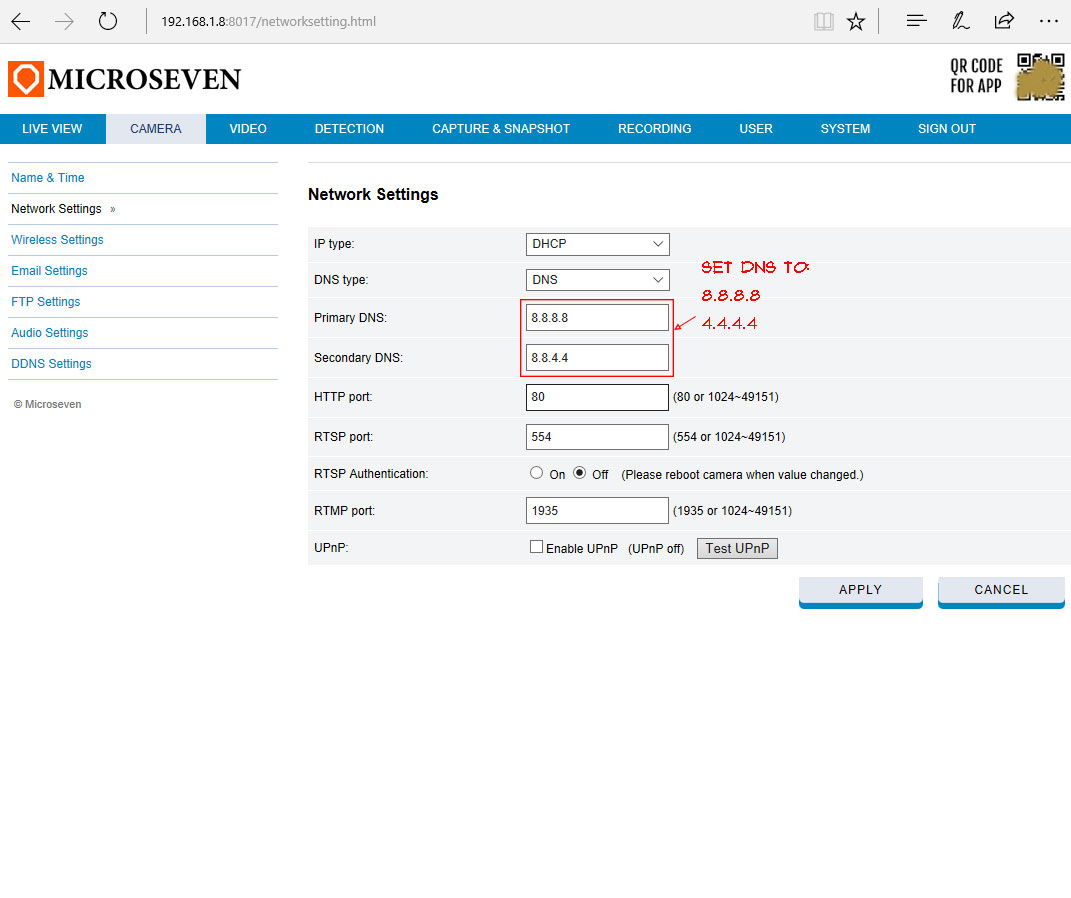
set dns to make camera stream flawlessly

Categories How To
List Of Error Messages On HLS Streaming
How To Get WiFi Setup On Wi-Fi Camera
Microseven® is a registered brand of Microseven Systems LLC.
© 2026 Microseven Systems LLC. All rights reserved.
