Skip to content
  • Contact Us
  • warranty
  • Support
    • Firmware
    • Getting Started
    • Camera Setup
    • Cloud Portal
    • CGI API
    • Edge AI
    • Troubleshooting
    • Downloads
    • Enterprise Support
  • User Guides – How-To
  • Docs

How To View The Alert Clips And Download To The Phone On App

January 19, 2020December 4, 2018 by microseven

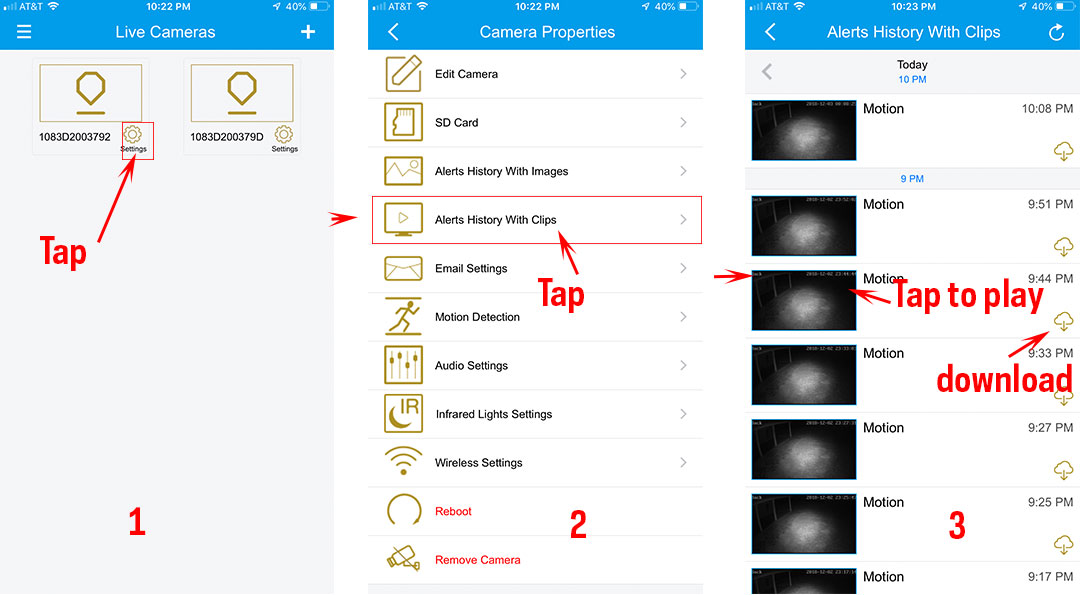
How to view the alert clips on the app

1. Tap on “Settings”
2. Tap on “Alert History With Clips”
3. Tap on the clip you want to view and play …
4. Tap on “Download icon” to the phone.

Categories How To
How To Record The Video On NVR (v2) With Audio
How To Copy & Paste The Embed Code To Your Site
Microseven® is a registered brand of Microseven Systems LLC.
© 2026 Microseven Systems LLC. All rights reserved.