Skip to content
  • Contact Us
  • warranty
  • Support
    • Firmware
    • Getting Started
    • Camera Setup
    • Cloud Portal
    • CGI API
    • Edge AI
    • Troubleshooting
    • Downloads
    • Enterprise Support
  • User Guides – How-To
  • Docs

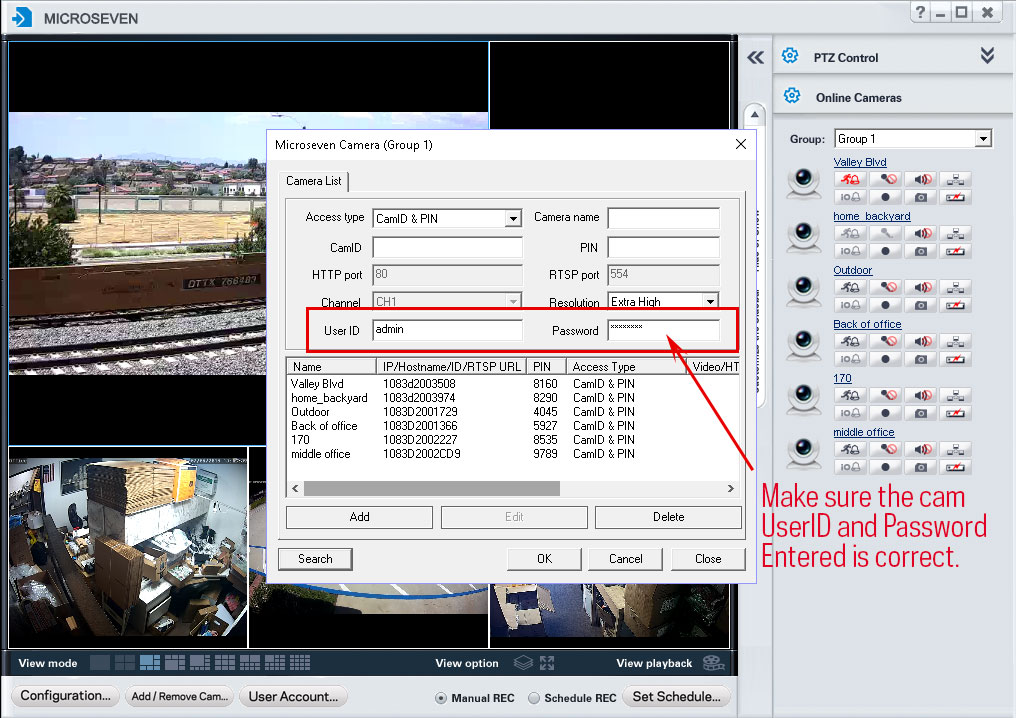
How to enter the camera UserID and Password in the CMS software in Windows

January 16, 2020July 6, 2018 by microseven

To find the place to enter UserID and Password while you are adding a camera in the CMS software in the Windows.

The following snapshot to show the place in the CMS software:
Categories How To
How Audio Works
How to adjust video streaming bit rate and bandwidth in M7CMS
Microseven® is a registered brand of Microseven Systems LLC.
© 2026 Microseven Systems LLC. All rights reserved.
