
How To Find A Camera Device Type

Go to microseven.com, firmware and software download to download the latest software for Windows or Mac. Then use Cam Locator to find a camera.
To find a camera Device Type using Cam Locator and click on the search button. The list of cameras is going to popup.
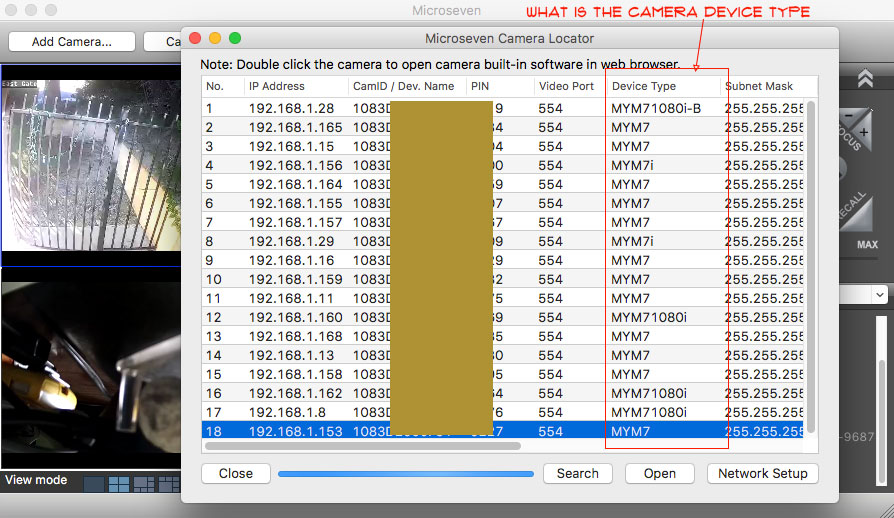
 

find a camera Device Type

5 thoughts on “How To Find A Camera Device Type”

  1. Why does the Microseven never print the model number and version details on their Camera? I got a old Microseven MYM7 camera but I could not change its video/lens setup and when I looked for the update, I found too many firmware releases. That shows that Microseven does not test the firmware extensively before release.

  2. Why does the Microseven never print the model number and version details on their Camera? I got a old Microseven MYM7 camera but I could not change its video/lens setup and when I looked for the update, I found too many firmware releases. That shows that Microseven does not test the firmware extensively before release.

  3. Why does the Microseven never print the model number and version details on their Camera? I got a old Microseven MYM7 camera but I could not change its video/lens setup and when I looked for the update, I found too many firmware releases. That shows that Microseven does not test the firmware extensively before release.

  4. Why does the Microseven never print the model number and version details on their Camera? I got a old Microseven MYM7 camera but I could not change its video/lens setup and when I looked for the update, I found too many firmware releases. That shows that Microseven does not test the firmware extensively before release.

  5. Why does the Microseven never print the model number and version details on their Camera? I got a old Microseven MYM7 camera but I could not change its video/lens setup and when I looked for the update, I found too many firmware releases. That shows that Microseven does not test the firmware extensively before release.

Leave a Comment